Email for your team and your product, in one account.
- Running today: mailboxes on your domain with SPF, DKIM and DMARC set up for you, the inbox (installable on your phone), the console, the API and SDK, and local MCP for the AI tools on your computer.
- Next: hosted MCP, and iOS and Android apps in the app stores.

Running today
Mail for the team, sending for the product.
Right now your team's mail probably sits with one provider and your product's receipts leave through another. Prawnwire runs both from one account, managed in one console.
Email for your team.
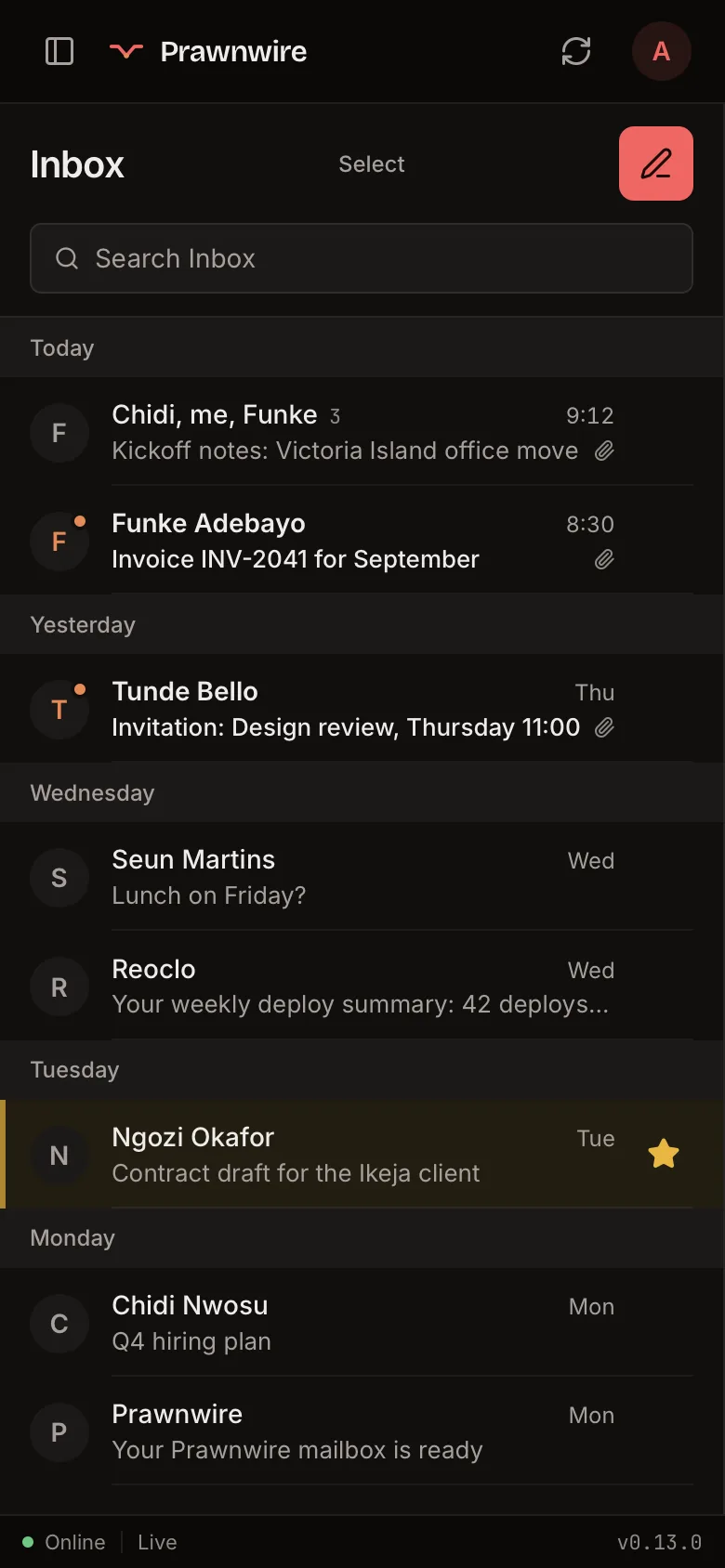
Mailboxes and aliases on your domain. Read mail in the browser, install the inbox on your phone for push notifications and offline reading of mail you've already opened, or use the desktop app on macOS and Windows.
Mail arrives as conversations, you answer meeting invites from the message, and you can schedule a send or undo one. Mailboxes your team keeps elsewhere join the same unified inbox, over IMAP. Senders show with their picture, or with their company's logo when their domain publishes one.
One sign-in covers the inbox and the console, and you can add a two-step code from an authenticator app.
A transactional API.
Your product sends receipts, invites, password resets and alerts from the same domain your team mails from, with a key from the console.
It comes with test keys, delivery and bounce events, and bounced addresses suppressed for you.
Your product
POST /v1/email
Receipts, resets, invites, with a key from the console.
Prawnwire
yourdomain.com
- Mailboxes, DNS, sending identities, DMARC reports.
- Your team's inbox on web, phone and desktop.
Your AI tools
MCP: local today, hosted next
Search, read and send your mail, and move it between folders.
Running today
Your domain and your team, in one console.
Sign up, prove you own the domain with one TXT record, and Prawnwire adds it to the mail server for you. The console lists every DNS record the domain needs and checks each one: download them as a file to import into Cloudflare, or email the steps to whoever runs your DNS. Then create your mailbox, add the rest of the team one at a time or from a CSV, and set up shared addresses like sales@ that deliver to several people.
- Admins and read-only members, and more than one domain per organisation.
- Storage pooled across the organisation, with a size you set for each mailbox.
- Select many mailboxes at once to suspend, resume, add to a group, export as CSV or delete.
- Go over a limit and nothing is deleted or suspended: existing mailboxes keep working, and new ones wait until you're back under it.
- Only mailboxes your organisation manages can sign in to the inbox, and you choose whether people can add accounts from other providers.
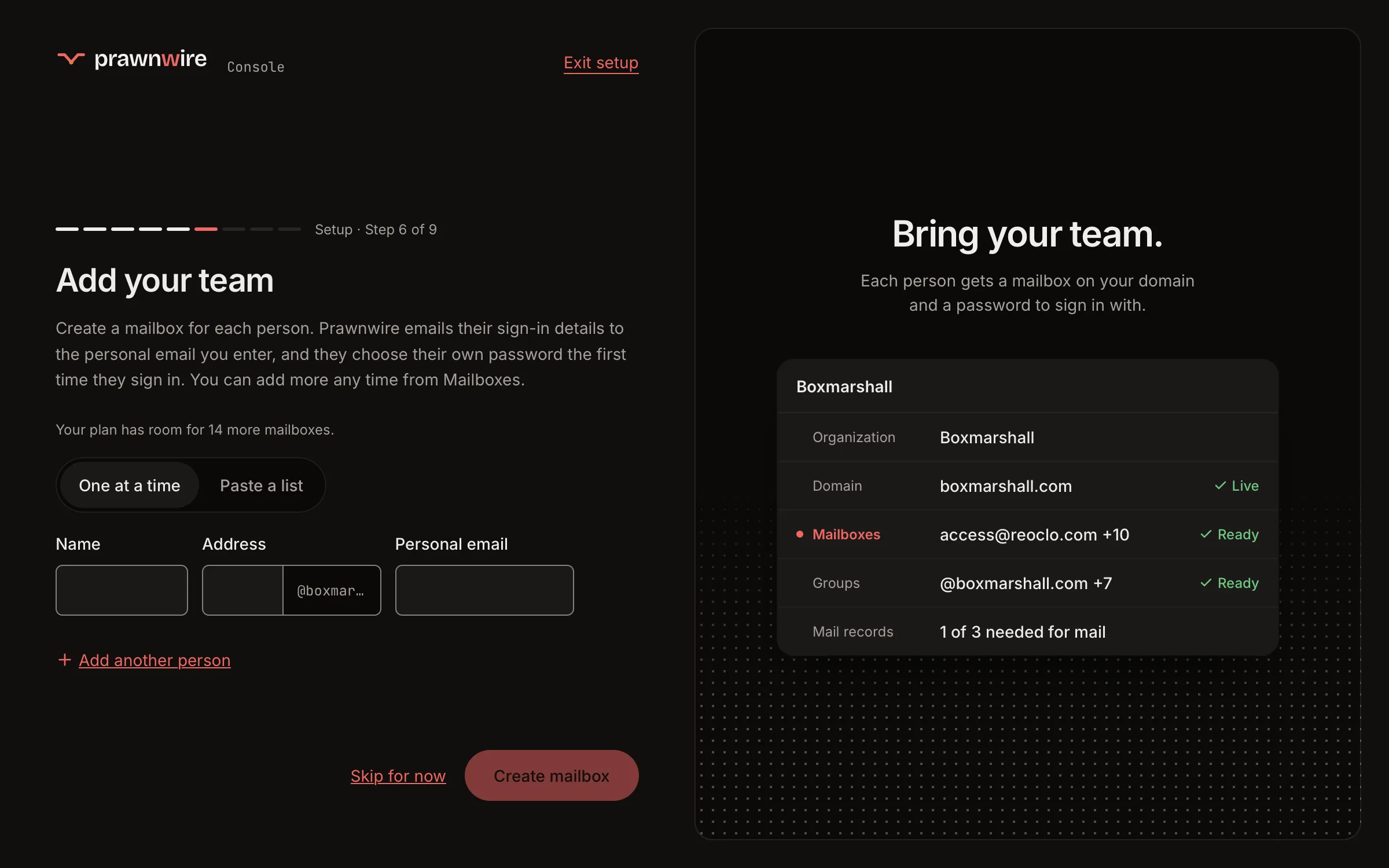
Setup in the console, from a demo organisation. Open it full size.
Running today
Your DMARC reports, read for you.
The DMARC record Prawnwire gives you sends your domain's aggregate reports to Prawnwire, which reads them. The console shows who sends mail as your domain and whether it passes. It looks back over 28 days of reports and tells you when the domain is ready for a stricter policy, with the exact record to publish.
- Prawnwire never changes your DNS. You confirm you recognise every sender before you copy the new record.
- A report counts only when it arrives with DMARC passing, so a forged report can't make your domain look ready.
- Upload your logo and Prawnwire hosts it, with the BIMI record that shows it beside your mail in apps that support it. The console says what each app still needs: Gmail and Apple Mail also ask for a certificate.
reports 28 days, 4 reporters
sources 2, both passing
verdict ready for quarantine

- v=DMARC1; p=none; rua=mailto:…
+ v=DMARC1; p=quarantine; rua=mailto:…
An illustration with example figures. The console shows your own domain's reports and record.
Your inbox, in your AI tools.
Connect the AI tools on your computer to your mail over MCP, the open protocol AI tools use to reach apps and data. They can search, read and send your mail, and move messages between folders. A hosted server, for assistants that run online, is next.
Local MCP
Running today
Runs on your own machine, for the AI tools and agents you use there.
Hosted MCP
Next
Connect a web-based AI assistant to your mailboxes, with nothing to install.
Running today
Send from your product.
A REST API for transactional email, under
/v1, with its reference at
docs.prawnwire.com.
- Sends from your organisation's verified domains, with a key from the console.
- Single and batch sends, and test keys that send nothing.
-
Our SDK for Node and TypeScript, with no dependencies, runs on Node 18 and later,
Bun, Deno and Cloudflare Workers:
npm install prawnwire, source on GitHub. - Message activity and delivery events through the API, with bounced recipients suppressed automatically.
- Every plan includes a monthly allowance of API emails (see the plans below), with a daily cap of a tenth of it. Admins can ask for more in the console.
import { Prawnwire } from 'prawnwire'

const prawnwire = new Prawnwire()

await prawnwire.emails.send({
  from: 'hello@yourdomain.com',
  to: 'someone@example.com',
  subject: 'Welcome aboard',
  html: '<p>Thanks for joining.</p>',
})
A send with the SDK, using a key from the console in
PRAWNWIRE_API_KEY. Webhooks, open and
click tracking and templates are not available yet.
Today, and next.
Running today
- Mailboxes and aliases on your domain, with SPF, DKIM and DMARC set up for you
- The inbox in the browser, installable on your phone, and on macOS and Windows, with mailboxes you keep elsewhere joining over IMAP
- The console, for your domain, mailboxes, people, groups and storage
- DMARC reports read for you, and a stricter policy suggested when your domain is ready
- The transactional API and our SDK for Node and TypeScript, with the reference at docs.prawnwire.com
- Local MCP, for the AI tools on your computer
- Standard IMAP and SMTP on open mail software (Postfix, Dovecot, Rspamd), so other mail clients work and your mail can leave with you
Next
- Hosted MCP, for AI assistants that run online
- Apps for iOS and Android in the app stores
Priced per organisation.
A plan covers your whole organisation: mailboxes, domains, shared addresses (like sales@), the storage the mailboxes share, and the emails your product sends through the API. A mailbox costs NGN 3,300 a month on Solo founder and NGN 2,900 on Established company. Storage grows with the plan: 3 GB per mailbox, shared across the organisation.
You choose the plan in the console after you sign up, and can change it there. Go over a limit and nothing is deleted or suspended.
Solo founder
Look established from day one, on your own domain.
NGN 3,300 per month
NGN 33,000 per year
12 months for the price of 10
- 1 mailbox
- 1 domain
- 3 GB of storage
- 1 shared address
- 12,500 API emails a month
Duo
Run the business together, with an address each.
NGN 6,400 per month
NGN 3,200 per mailbox a month
NGN 64,000 per year
NGN 32,000 per mailbox a year
12 months for the price of 10
- 2 mailboxes
- 1 domain
- 6 GB of storage
- 2 shared addresses
- 25,000 API emails a month
Small team
RecommendedGive your whole team a professional address.
NGN 15,500 per month
NGN 3,100 per mailbox a month
NGN 155,000 per year
NGN 31,000 per mailbox a year
12 months for the price of 10
- 5 mailboxes
- 1 domain
- 15 GB of storage
- 5 shared addresses
- 62,500 API emails a month
Growing business
Room to add people and domains as you grow.
NGN 30,000 per month
NGN 3,000 per mailbox a month
NGN 300,000 per year
NGN 30,000 per mailbox a year
12 months for the price of 10
- 10 mailboxes
- 3 domains
- 30 GB of storage
- 10 shared addresses
- 156,250 API emails a month
Established company
Run several teams and domains from one console.
NGN 72,500 per month
NGN 2,900 per mailbox a month
NGN 725,000 per year
NGN 29,000 per mailbox a year
12 months for the price of 10
- 25 mailboxes
- 5 domains
- 75 GB of storage
- 25 shared addresses
- 375,000 API emails a month
Shared addresses named info@, support@, contact@, hello@, help@, postmaster@ or abuse@ are free on every plan and don't count toward its limit.
Put your business on its own domain.
Sign up, prove your domain with one TXT record, and the console lists and checks the rest of its records. Your mail stays on standard IMAP and SMTP, so it can leave with you.